Practical Software for Bricklayers

Stop Guessing.
Start Gauging.

From measuring plans to recording the work and keeping track of payments. TallyTrowel is a growing range of practical tools built around life on site β€” starting with our Android masonry takeoff app.

Early access is for the Android takeoff app. Other products have their own availability below.
πŸ“ Plan Tracing
🧱 Brick & Block Takeoff
πŸ“„ Professional Reports

Tools for the job.
From plans to paperwork.

Explore what we’re building, what’s being tried on site and what existing users can access today.

Live Β· Existing users

Wages Portal & Files

Keep payments and paperwork together.

Worker payment records, statements and queries, with photos and PDFs shared through controlled file access.

For existing authorised accounts. Public registration is not currently offered.

Entering live trials

Site Diary

A clear record of the working day.

Record working hours, stoppages, work types and daily details, then bring your entries together into reports.

Tested and preparing for real-job use. No public download yet.

Entering live trials

BrickBook Pro

Keep your booking-in organised.

Record completed work, quantities and earnings, with ledgers and reports to help you keep track of the job.

Booking-In has been tested and is ready for real-job use. No public download yet.

Coming soon

Pike Calculator

A focused calculator for gables and pikes.

A separate, free app is planned for practical pike calculations, including base-and-height and pitch-based methods.

Planned as our first Google Play release. Download details will follow when ready.

Planned

Price Work Calculator

Make sense of the rate and the return.

A planned tool for quantities, rates, gang splits, extras and deductions to help estimate what a job could earn.

In the development plan. Features and release details are still to be confirmed.

In development Β· Windows

TallyTrowelTakeoff

A bigger workspace for desktop takeoffs.

Our Windows application is being developed for plan measurement, masonry quantities, materials and labour estimates, and reporting.

The desktop MVP is in development. No public download yet.

Clear availability, no guesswork. Live trials mean use on real jobs before a wider release. Each app is a separate tool; shared accounts, cloud storage and device syncing are not implied across the range.

From Building Plan to Takeoff

See the workflow in the app β€” from tracing the plan to live quantities and a finished report.

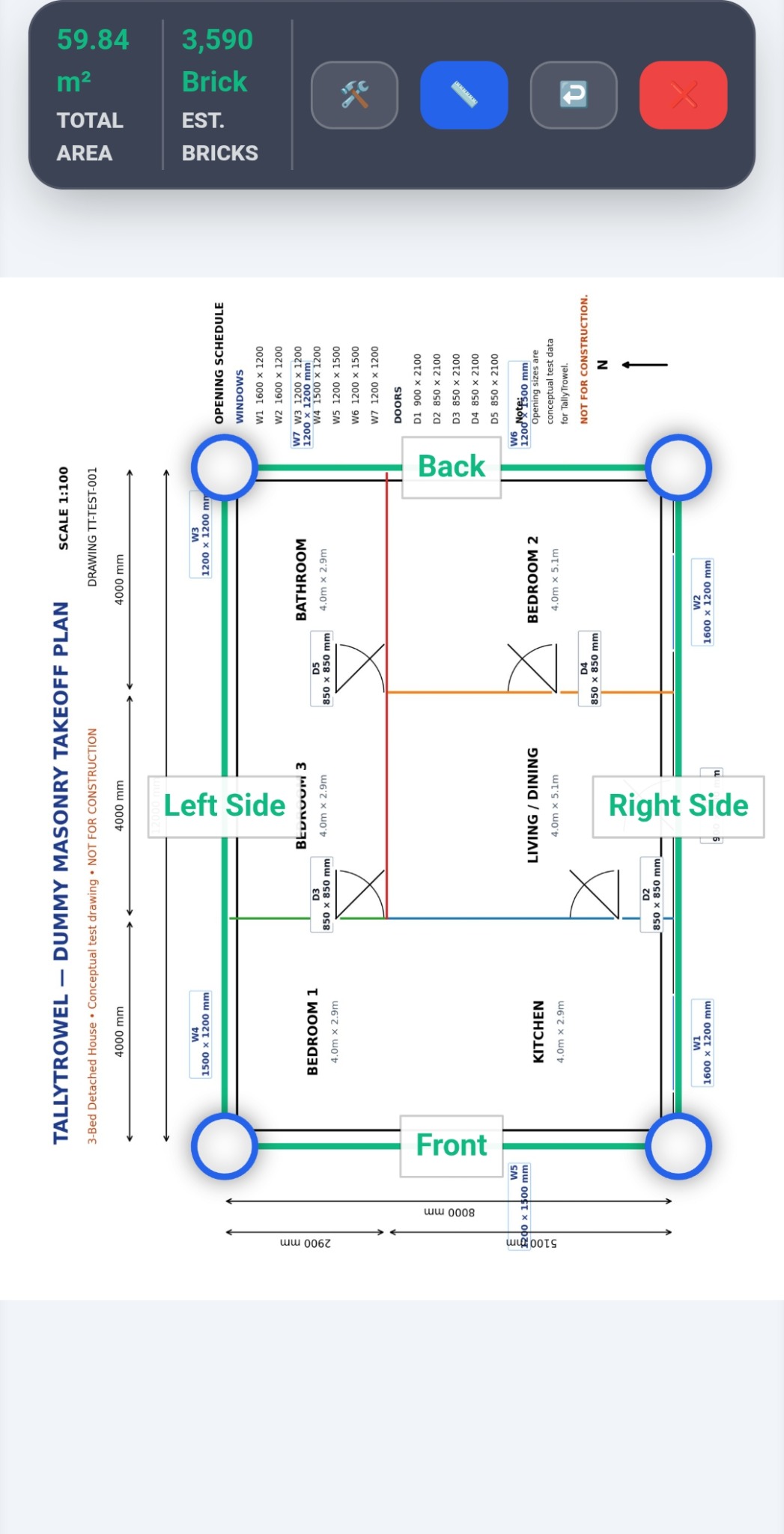
TallyTrowel building plan with traced walls, wall labels and opening schedule

Trace your plan. Measure your walls. Get your quantities.

Load a building plan, calibrate it using a known dimension and trace the walls directly on screen. TallyTrowel turns those measurements into a live masonry takeoff.

  • Calibrate plans using known dimensions
  • Trace walls directly on the drawing
  • See live area and brick quantities as you work
  • Review everything in the Takeoff Ledger

See the Tools in Action

Real screens from the TallyTrowel app β€” not stock images or mock-ups.

TallyTrowel live takeoff screen showing total area and estimated bricks
Live quantities while you work
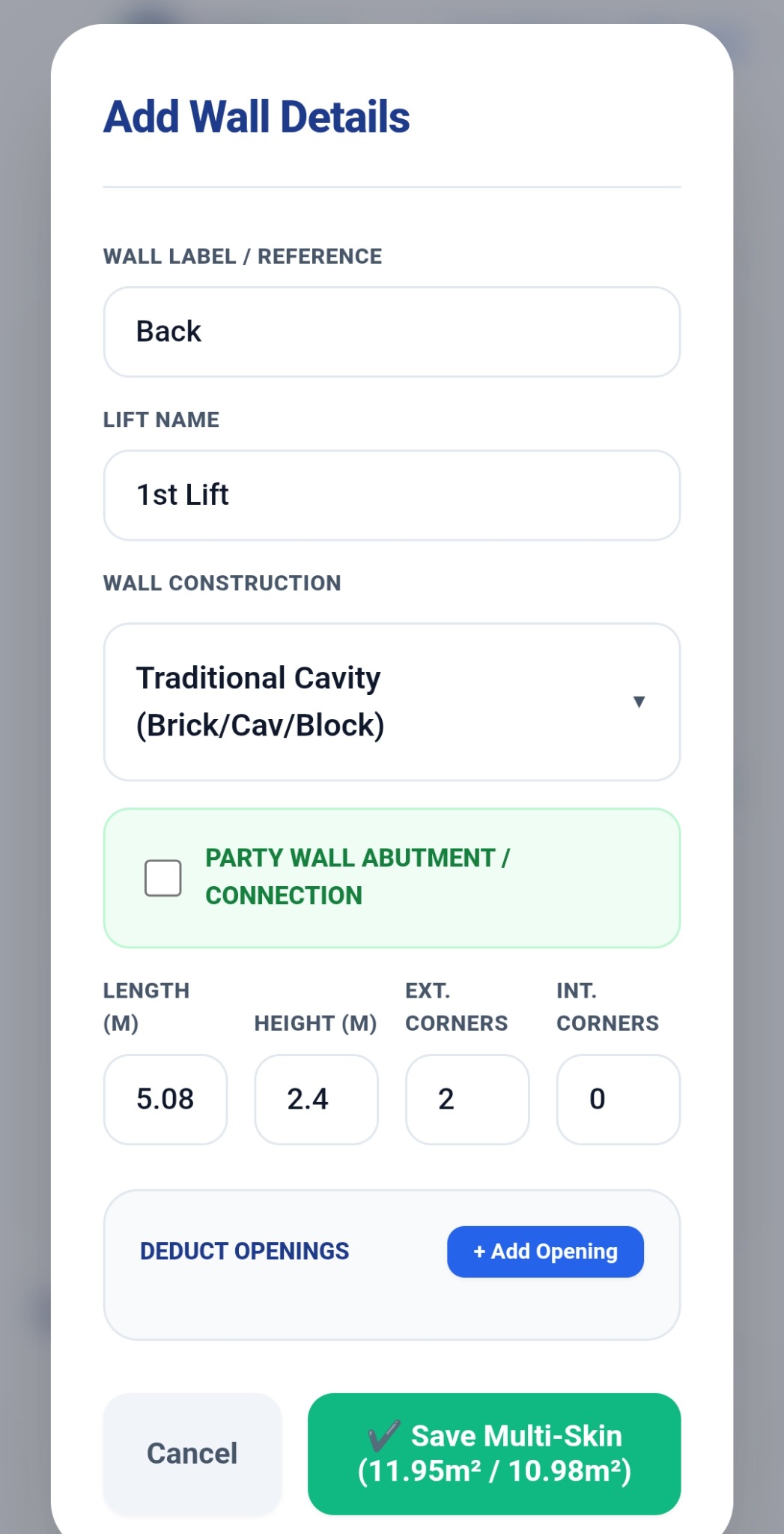
TallyTrowel wall details and construction screen
Detailed wall calculations
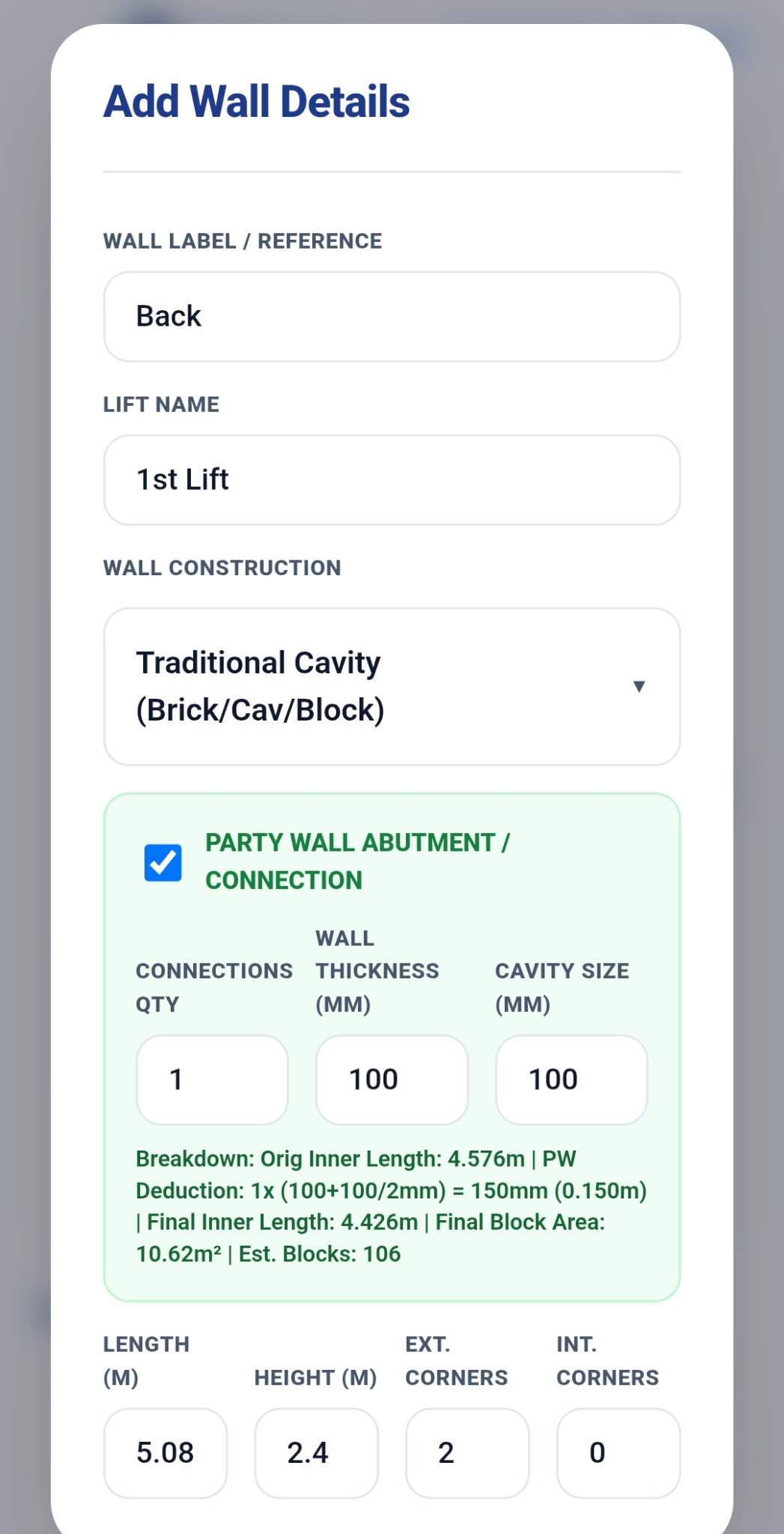
TallyTrowel Traditional Cavity party wall calculation
Traditional cavity & party-wall calculations
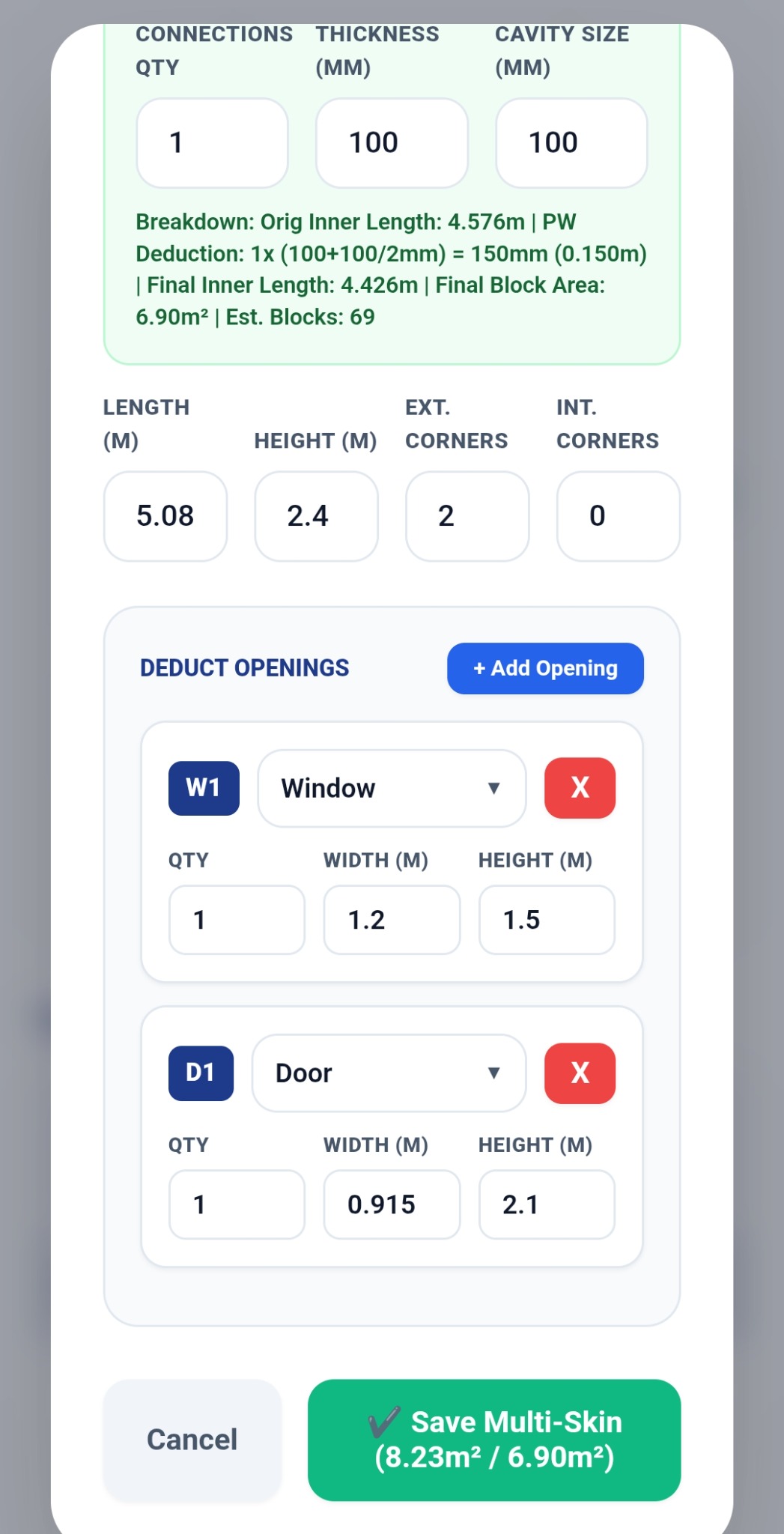
TallyTrowel opening deductions with W1 window and D1 door references
Windows, doors & automatic references
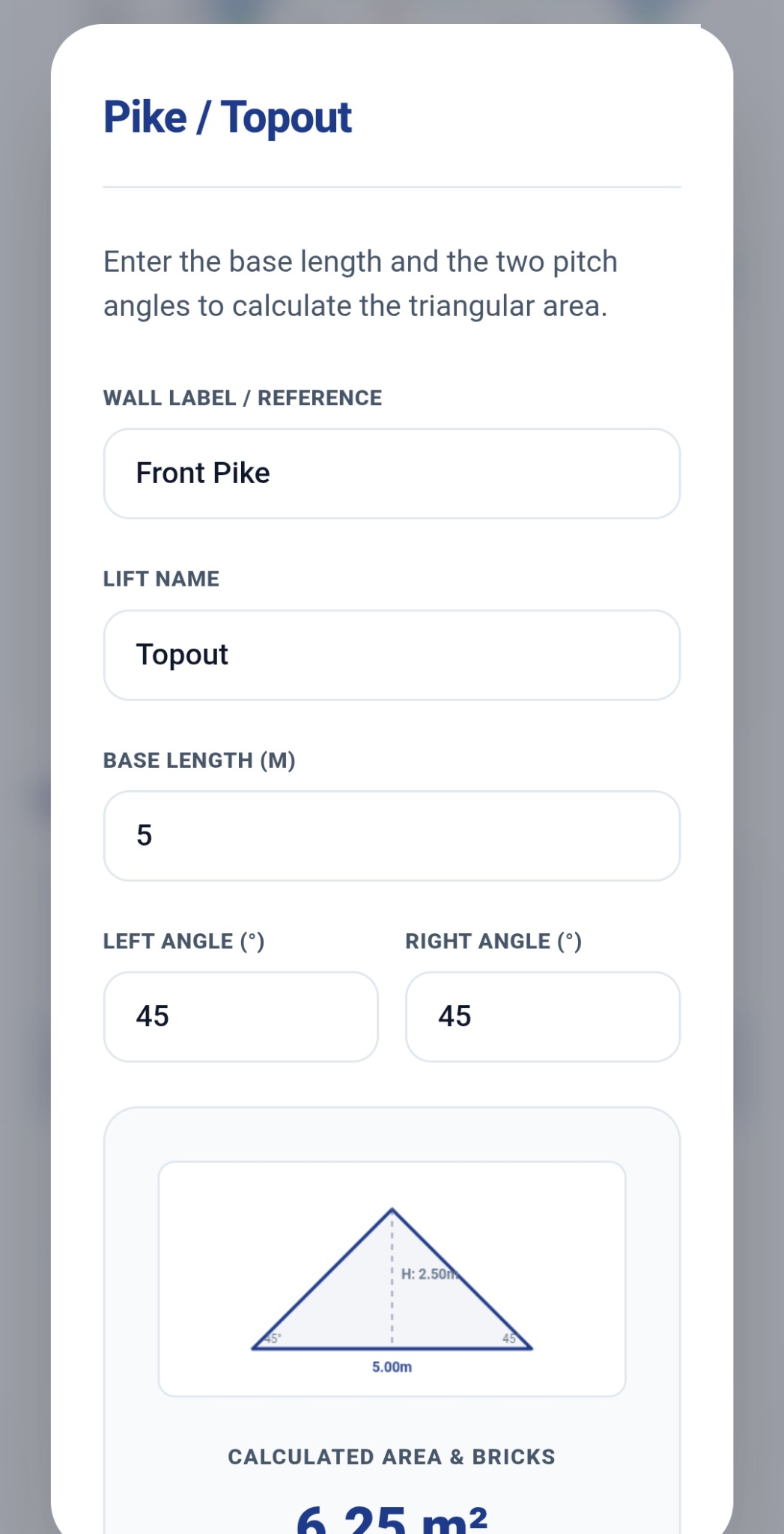
TallyTrowel Pike and Topout calculator
Pike / Topout calculations
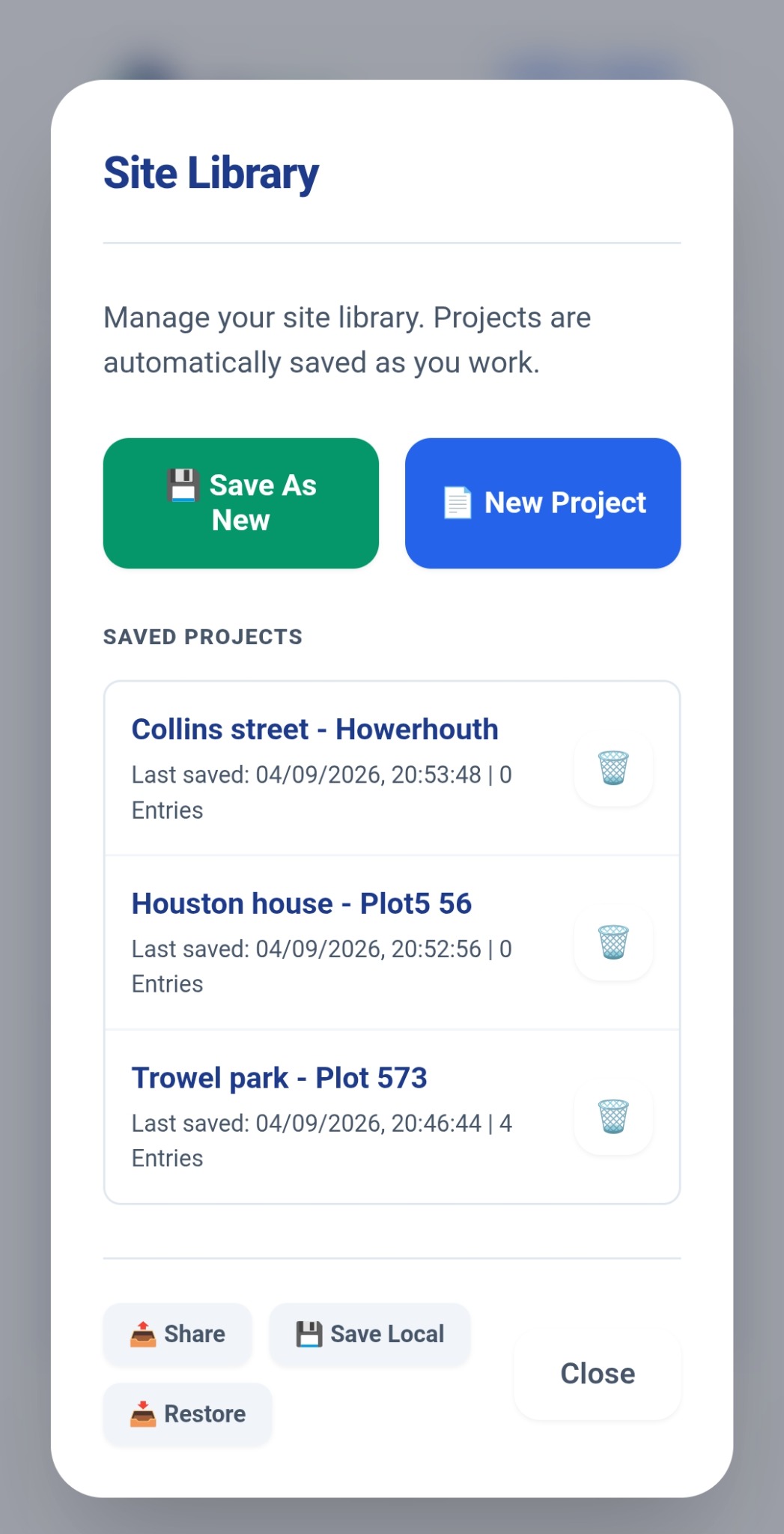
TallyTrowel Site Library showing saved projects
Site Library for saved projects

Finish with a professional takeoff report.

Your completed takeoff can be turned into a clear PDF report with project details, wall breakdowns, deductions, quantities, values and project totals.

  • Clear wall-by-wall breakdowns
  • Brick and block quantities
  • Opening deductions and pike calculations
  • Project totals ready to save or share
TallyTrowel professional PDF takeoff report
Example TallyTrowel takeoff report

Built Around the Way Masonry Takeoffs Work

Focused tools for the measurements and calculations that matter.

πŸ“

Plan Tracing

Load plans, calibrate the scale and trace walls directly on screen.

🧱

Brick & Block

Calculate masonry quantities for brickwork and blockwork from your measured walls.

🏠

Cavity Walls

Calculate separate brick and block leaves, including party-wall connections.

πŸšͺ

Openings

Add windows, doors and other openings and deduct their areas automatically.

πŸ”Ί

Pike Calculations

Calculate gable and pike areas using pitch and base measurements.

πŸ“‹

Takeoff Ledger

Review walls, deductions, areas, quantities and estimates in one place.

πŸ“„

PDF Reports

Turn your completed takeoff into a professional report you can save and share.

πŸ—‚οΈ

Site Library

Keep multiple projects and plots organised on your device.

Four Simple Steps

Designed to keep the workflow quick and easy to follow.

01 β€” LOAD

Load your plan

Bring your building plan into TallyTrowel.

02 β€” CALIBRATE

Set the scale

Use a known dimension so your measurements are tied to the real building.

03 β€” TRACE & CALCULATE

Measure the job

Trace walls, add openings and calculate your masonry quantities.

04 β€” REVIEW & REPORT

Check and report

Review the Takeoff Ledger and produce your professional PDF report.

Built by a Bricklayer

Why I Built TallyTrowel

I built TallyTrowel because I wanted a quicker and easier way to work out masonry quantities from building plans.

Measuring walls, counting bricks and blocks, allowing for openings and then checking everything again takes time β€” and sometimes you're left wondering whether you've actually counted everything correctly.

I wanted something that could make that process quicker, clearer and easier to check without making it complicated. So I started building TallyTrowel.

Built by a bricklayer, for the people who actually do the work.

Built for the People Who Do the Work

πŸ‘· Bricklayers

Work out masonry quantities quickly from building plans.

πŸ—οΈ Contractors

Prepare clearer takeoffs and estimates for your projects.

πŸ“ Estimators & QSs

Review measurements, deductions and calculations in one place.

🏠 Housebuilders

Keep plots and project takeoffs organised on your device.

Android Takeoff: Local-First Projects

The Android takeoff app is designed around local project storage on your device. The Wages Portal & Files is a separate online service with account-based access. Storage and backup arrangements depend on the product you use.

πŸ”’ Android takeoff: no account required
πŸ“± Projects stored locally on your device
πŸ“„ Manual backup and restore available

Inside the V1 Takeoff Toolkit

The core tools in the Android app under development. Public release and download details will be announced when ready.

βœ“ TallyTrowel V1

βœ“ Plan tracing
βœ“ Calibration
βœ“ Brick & block calculations
βœ“ Traditional cavity walls
βœ“ Party wall calculations
βœ“ Windows, doors & deductions
βœ“ Pike calculations
βœ“ Wall lifts
βœ“ Takeoff Ledger
βœ“ Professional PDF reports
βœ“ Site Library
βœ“ Local project storage

Building on the Core Tools

TallyTrowel V1 is focused on the core masonry takeoff workflow. Future versions can build on that foundation.

V1.1 β€” PlannedMaterial counts & wastage options
FutureExpanded material estimation
FutureCloud backup & multi-device sync
FutureQuotes & invoice generation

Questions, Answered

What is TallyTrowel?

TallyTrowel is a growing range of practical software for bricklayers and contractors. The main Android app focuses on masonry takeoff, with separate tools for payments, site records, booking-in and future calculators and desktop takeoffs.

Can I download all the apps now?

No. The Wages Portal & Files is live for existing authorised users. Site Diary and BrickBook Pro are entering live trials. The Android takeoff app, calculators and Windows software have the availability shown in Our Apps. We will add public download links when each product is ready.

Does my portal login work with every app?

No shared login across the range is currently promised. The portal uses its own authorised accounts. The Android takeoff app is designed for local project use without a TallyTrowel account.

Who is TallyTrowel designed for?

It is designed primarily for bricklayers, contractors, estimators, quantity surveyors and housebuilders who need to work out masonry quantities from plans.

Can TallyTrowel calculate cavity walls?

Yes. V1 supports Traditional Cavity construction, including separate brick and block leaves and party-wall connections.

Can I deduct windows and doors?

Yes. Add windows, doors and other openings and TallyTrowel deducts their measured areas from the relevant wall calculations.

Can TallyTrowel calculate pikes?

Yes. TallyTrowel includes a pike calculator for gable areas using pitch and base measurements.

Where are my projects stored?

The Android takeoff app uses local-first project storage with manual backup and restore. The Wages Portal & Files uses online account-based storage. Check the guidance and privacy information for the specific product you use.

Can I create a PDF report?

Yes. Completed takeoffs can be turned into professional PDF reports that can be saved or shared.

What devices is TallyTrowel available on?

TallyTrowel is being developed for Android. Availability and download details will be provided when the release is ready.

Ready to Stop Guessing?

Join the Android takeoff early-access list, or explore the other tools taking shape across the TallyTrowel range.

Get Early Access